
• Link to Facebook
  • Link to LinkedIn
  • Link to X
  • Login
  • Calendar
+1 913-338-3377
International Association of Operative Millers
  • Education
    • Resident Milling Courses
      • Overview
      • Course Schedule
      • Online Enrollment Form
    • Correspondence Course and Distance Education
      • Correspondence Course in Flour Milling
      • Milling Technician Certificate Program
  • Districts & Regions
    • Districts
      • Central
      • Flour City
      • Niagara
      • Ohio Valley
      • Southeastern
      • Texoma
      • Western
      • Western Canadian
      • Wheat State
      • Wolverine
    • Regions
      • Eurasia
      • Latin America
      • Mideast & Africa
      • South Asia
      • Southeast Asia
  • Annual Conference
  • Join IAOM
    • Membership Application
    • Membership Renewal
  • IMEF
  • Resources
    • Industry Resources
      • Associations
      • Classifieds
      • Community Outreach
      • Events
      • Grains
      • Fortification
      • Milling Companies
      • Milling Suppliers
      • Other Industry Publications
      • Government Resources
      • Schools
    • Publications
      • IAOM First Break: Stories from the Roll Floor
      • Books
      • Videos
      • Weekly Bulletin
    • Marketing Opportunities
      • Overview
  • About
    • Board
    • Standing Committees
    • IAOM Headquarters Team
    • Bylaws
    • History
  • Blog
  • Contact Us
    • FAQs
  • Click to open the search input field Click to open the search input field Search
  • Menu Menu

Mobile-App & Lead Retrieval

The Official App for IAOM’s 123rd Annual Conference & Expo (ACE) is now available!

The event app is one component of the NEW iaom365 Membership App. You can download the Membership App (iaom365) via the Apple Store or Google Play Store by searching for IAOM 365 (include a space in between IAOM and 365). Below is also an auto detect link that you can use to install the app.

Auto Detect link: www.tripbuildermedia.com/apps/iaom365
Log In:

Once you have downloaded the app you will be prompted to login using a username and password. You should already have a username and password if you have previously logged onto the IAOM Online Store. If you do not remember this information you will need to go to the IAOM Online Store and select “Forgot your Password?”.

If you have never logged into the IAOM Online Store you will need to click here to access the Login Page. You will click “Forgot your Password” and then type in your email address and hit go. The system will then send you an email with instructions on how to change your password/create a new password. You will then use your email address and the new password to login to the IAOM Membership & Event app.

Event App:
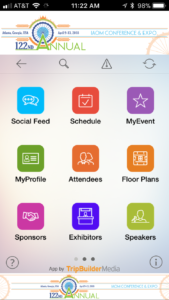
Once logged into the iaom365 Membership App, please tap the Event icon and you will see the Annual IAOM Conference & Expo event listed. Once you tap on this event, you will be directed to the Event App.

In the Event App, you will be able to review the conference schedule and speakers, see who is exhibiting, connect with others at the event, and view interactive floor plans for the Convention Center and Hotel. You can also create your own schedule and manage your profile. Be sure to take advantage of the information about Denver and share photos in the Gallery.

Lead Retrieval: This app has built-in lead retrieval and attendee networking capabilities where users are able to scan each other’s QR codes within the app to record attendee information. Each attendee has his or her own personal QR code that is linked to his or her attendee information (name, contact information, etc.). The badges will display all the information you find useful – name, company, etc. along with the QR code that matches each attendees’ detailed information on the app. Because the QR code is the same within the mobile event app and on the printed badge it makes it easy for attendees to network with each other or for exhibitors to generate leads. In addition to being able to select Qualifying categories to each lead, exhibitors can also export their list of leads to their email to follow up with their new business opportunities after the event is over.

The app and lead retrieval functionality are complimentary to each registered attendee.

How to capture leads within the event app:

  1. First you will need to be logged into the event app, then you will use the Scan Badge icon to scan attendee’s badges
  2. Next you can add any notes/qualifiers for this attendee and hit save. This will save to your MyLeads under your MyEvent
  3. You can then share this contact, add to address book, email this contact or call this contact if a # was provided by the attendee
  4. When you are ready to export all of the leads that you save in your MyLeads icon you will need to follow the instructions below

How to export leads within the event app:

  1. From the main screen in the IAOM 365 app after it has first been opened:
  2. Click the purple “Events” icon
  3. Click the April 15-19 Conference in Denver
  4. Click the purple “My Event” icon
  5. Click the “Export” button in the upper right corner
  6. Select “My Leads” from the bottom of the list then click “Send”
  7. Enter your email address and a CSV (Excel) file with all your lead’s information will be sent to your email address.

It may take 5-10 minutes to receive the file. If you have any questions please contact Christine McLeod

Annual Meeting Links

  • Schedule at a Glance
  • General Information
  • Expo Information
  • Sponsorship Information

Useful Links

Renaissance Convention Center Hotel
Welcome to Schaumburg
Things to Do
Getting Around
Food & Drink

Quick Links

  • IAOM’s Online Store
  • Live Learning Center
  • Career Resource Center
  • IAOM Virtual Library
  • Member Directory
  • District Presentations

Contact

12351 W. 96th Terrace, Suite 100
Lenexa, Kansas 66215 USA
Phone: +1-913-338-3377
Fax: +1-913-338-3553

IAOM Privacy Policy


Translate

  • Arabic
  • Chinese
  • French
  • Italian
  • Russian
  • Spanish
Copyright © International Association of Operative Millers. All rights reserved.
  • Link to Facebook
  • Link to LinkedIn
  • Link to X
  • Education
  • Districts & Regions
  • Annual Conference
  • Join IAOM
  • IMEF
  • Resources
  • About
  • Blog
  • Contact Us
Scroll to top Scroll to top Scroll to top

This site uses cookies. By continuing to browse the site, you are agreeing to our use of cookies.

Accept settingsHide notification onlySettings

Cookie and Privacy Settings


How we use cookies

We may request cookies to be set on your device. We use cookies to let us know when you visit our websites, how you interact with us, to enrich your user experience, and to customize your relationship with our website.

Click on the different category headings to find out more. You can also change some of your preferences. Note that blocking some types of cookies may impact your experience on our websites and the services we are able to offer.

Essential Website Cookies

These cookies are strictly necessary to provide you with services available through our website and to use some of its features.

Because these cookies are strictly necessary to deliver the website, refusing them will have impact how our site functions. You always can block or delete cookies by changing your browser settings and force blocking all cookies on this website. But this will always prompt you to accept/refuse cookies when revisiting our site.

We fully respect if you want to refuse cookies but to avoid asking you again and again kindly allow us to store a cookie for that. You are free to opt out any time or opt in for other cookies to get a better experience. If you refuse cookies we will remove all set cookies in our domain.

We provide you with a list of stored cookies on your computer in our domain so you can check what we stored. Due to security reasons we are not able to show or modify cookies from other domains. You can check these in your browser security settings.

Other external services

We also use different external services like Google Webfonts, Google Maps, and external Video providers. Since these providers may collect personal data like your IP address we allow you to block them here. Please be aware that this might heavily reduce the functionality and appearance of our site. Changes will take effect once you reload the page.

Google Webfont Settings:

Google Map Settings:

Google reCaptcha Settings:

Vimeo and Youtube video embeds:

Privacy Policy

You can read about our cookies and privacy settings in detail on our Privacy Policy Page.

IAOM Privacy Policy
Accept settingsHide notification only